
Reviewing Roles

Configuration Setup
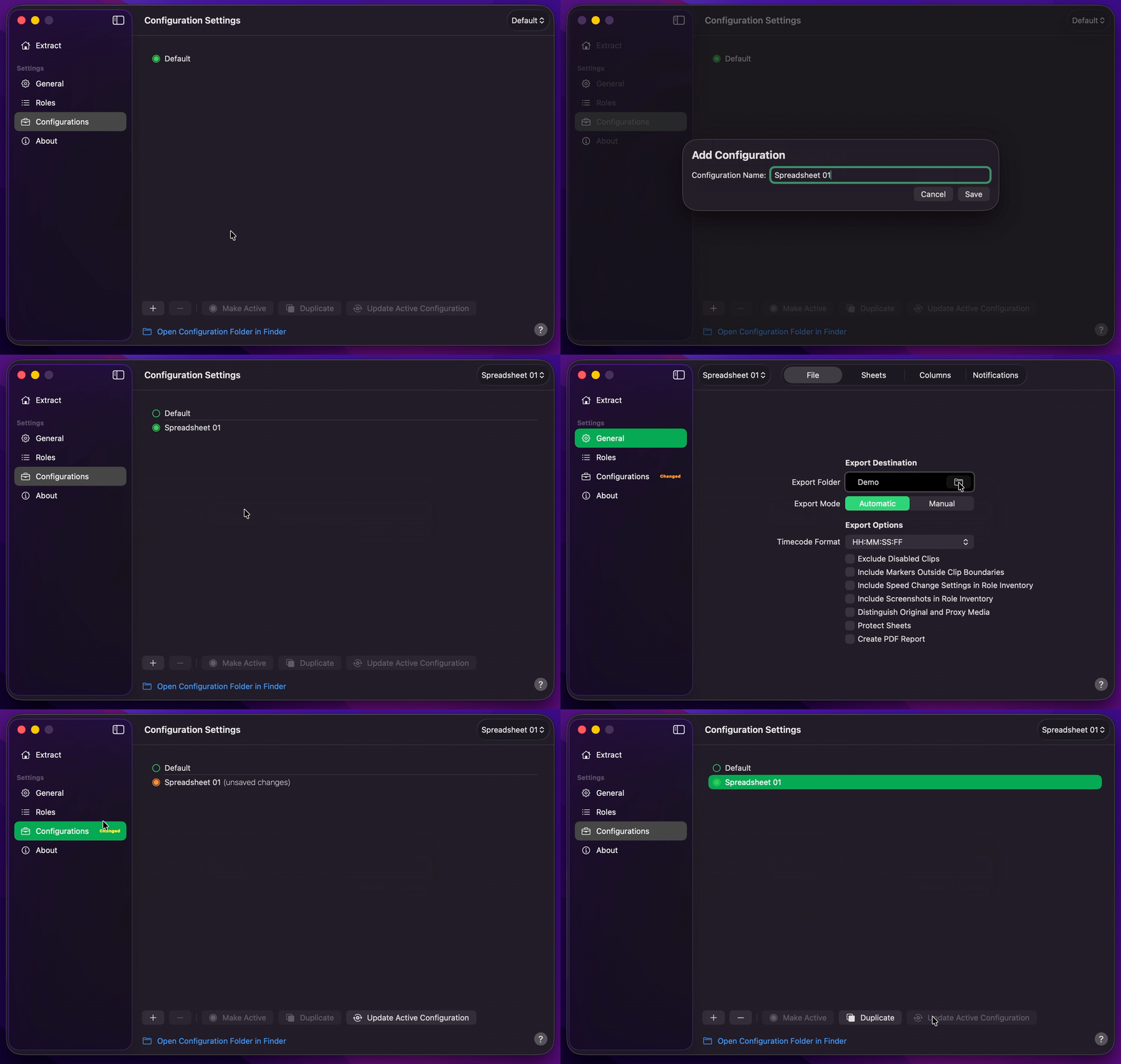
- Create Your Configuration.
- Select your desired Export Destination by clicking on the Folder Icon.
- Switch to
ManualExport Mode so Roles stays open while you review. - Return to Configurations to Update Active Configuration.
Info
Disabled roles are omitted from Role Inventory and from Markers, Keywords, Titles & Generators, Video & Audio Effects, Speed Change Effects, and Summary. Transitions, Non-Standard Effects & Templates, and Media Summary are unchanged. Role enable and disable choices are saved with the active Configuration when you update it.
Review Roles
- Drag and drop your
.fcpxmlor.fcpxmldfile onto Roles, or drag a timeline / compound clip from Final Cut Pro. - Review the
VideoandAudiotabs. Enable or disable roles as needed — or useEnable All/Disable Allfor the selected tab. - Switch to Extract and press
Start Export. - Production Data will create an Excel workbook (
.xlsx) that includes only the enabled roles on those sheets.